





System Requirements
Ensure you're ready for Microsoft's amazing new operating system!These are the minimum requirements to install Microsoft Windows 11 on a PC. If your device does not meet these requirements, you may not be able to install Microsoft Windows 11. If you are unsure whether your PC meets these requirements, you can use the PC Health Check app to assess compatibility (requires Microsoft Windows 10, click here to download).
Processor 1 gigahertz (GHz) or faster with 2 or more cores on a 64-bit processor or System on a Chip (SoC)
RAM 4 gigabytes (GB)
Storage 64 GB of larger storage
Note: See “More information about storage when keeping Microsoft Windows 11 up to date” below for more details.System firmware UEFI, Secure Boot compatible
TPM Trusted Platform Module (TPM) version 2.0
Graphics card Compatible with DirectX 12 or later with WDDM 2.0 drivers
Display: High-definition display (720p) measuring over 9” diagonally, 8 bits per colour channel
Internet connection and Microsoft account:The Home version of Microsoft Windows 11 requires Internet connectivity and a Microsoft account to complete device setup upon first use.Switching a device from Microsoft Windows 11 Home to S mode also requires an internet connection.For all editions of Microsoft Windows 11, Internet access is required to perform updates and to download and use certain features. A Microsoft account is required for some features.Additional requirements may arise over time for updates, as well as requirements to enable specific features within the operating system.Some features in Microsoft Windows 11 have increased requirements beyond those listed above in the minimum requirements section. Below are some additional details regarding the requirements for key features:
- 5G support requires a 5G-compatible modem.
- Auto HDR requires an HDR monitor.
- BitLocker to Go requires a USB flash drive (available in Microsoft Windows 7 Pro editions and above).
- Client Hyper-V requires a processor with Second Level Address Translation (SLAT) capabilities (available in Microsoft Windows Pro editions and higher).
- Cortana requires a microphone and speaker and is currently available on Microsoft Windows 11 for Australia, Brazil, Canada, China, France, Germany, India, Italy, Japan, Mexico, Spain, the United Kingdom, and the United States.
- DirectStorage requires an NVMe SSD to store and run games that use the “Standard NVM Express Controller” driver and a DirectX12 GPU with Shader Model 6.0 support.
- DirectX 12 Ultimate is available with supported games and graphics chips.
- Presence requires a sensor capable of detecting human distance from the device or the intent to interact with the device.
- Intelligent video conferencing requires a camera, a microphone, and a speaker (audio output).
- The multi-voice assistant (MVA) requires a microphone and a speaker.
- A three-column layout requires a screen that has 1920 effective pixels or more in width.
- Enabling/disabling from the notification area requires a camera, microphone, and speaker (audio output). The app needs to be compatible with the functionality to enable global mute/unmute.
- Spatial sound requires supporting hardware and software.
- Teams requires a video camera, a microphone, and a speaker (audio output).
- The touchscreen requires a screen or monitor that supports multi-touch.
- Two-factor authentication requires the use of a PIN, biometric (fingerprint reader or illuminated infrared camera) or a phone with Wi-Fi or Bluetooth capabilities.
- Voice typing requires a PC with a microphone.
- Voice Activation requires a Modern Standby power model and a microphone.
- Wi-Fi 6E requires new IHV WLAN hardware and drivers, and a Wi-Fi 6E compatible AP/router.
- Microsoft Windows Hello requires a camera configured for near-infrared (IR) imaging or a fingerprint reader for biometric authentication. Devices without biometric sensors can use Microsoft Windows Hello with a PIN or a compatible Microsoft portable security key.
- Microsoft Projection requires a display adapter that supports the Microsoft Windows Display Driver Model (WDDM) 2.0 and a Wi-Fi adapter that supports Wi-Fi Direct.
- The Xbox app requires an Xbox Live account, which is not available in all regions. Please refer to Xbox Live Countries and Regions for the most up-to-date information on availability. Some features in the Xbox app will require an active Xbox Game Pass subscription. Learn more about Game Pass.
Microsoft Visio 2024 Professional
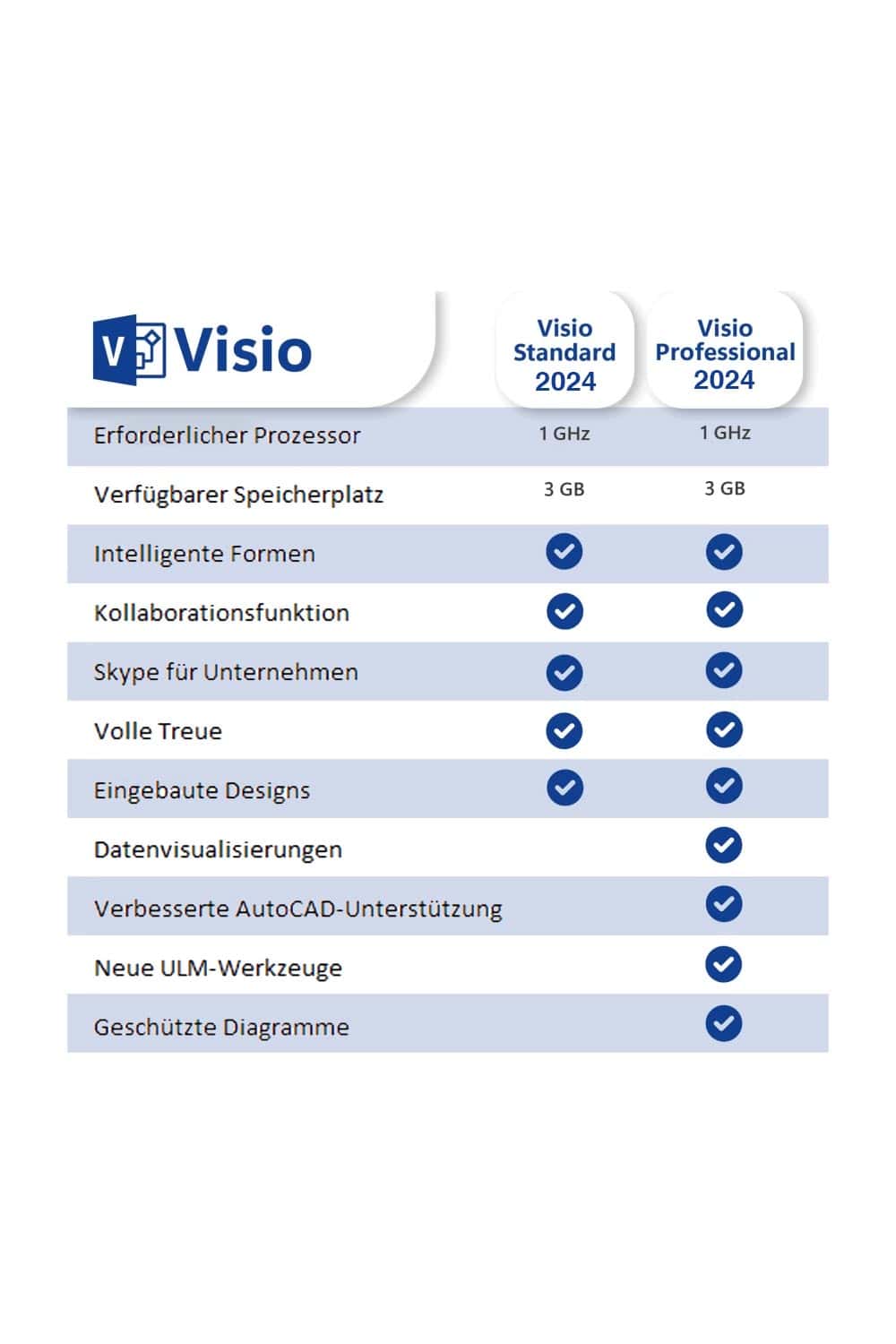
With Microsoft Visio 2024, it’s easier than ever for individuals and teams to create and share professional and versatile diagrams for any need. It includes updated shapes, templates, and styles, along with an intuitive new search bar and an updated look and feel that delivers a familiar user experience aligned with other Office applications.In Microsoft Visio 2024, you'll still find all the features you're used to, and you'll get some new ones:
- Microsoft Visio 2024 includes even more shapes, stencils, and templates to help you create your diagrams in less time.
- An updated look with a modern transparency effect applied behind the canvas and menus gives Visio 2024 a more modern and polished appearance.
- Visio 2024 introduces the new Office 2024 theme and colour scheme, including Dark Mode, a customisable interface, and accessibility improvements.
- The search in Visio is now available in the title bar, making it more accessible.
- Enhanced process analysis tools such as Dynamic Blocks to analyse business processes and visualise data flows.
Assistance and support
For any questions, please don't hesitate to contact us by email. Our customer service and support is available 24/7.