





Windows 11 Home (full unlimited version from a certified Microsoft Gold Partner)
-
Processor
1 gigahertz (GHz) or faster with 2 or more cores on a compatible 64-bit processor or System on a Chip (SoC) -
RAM
4 gigabytes (GB) -
Storage:
Storage device of 64 GB or largerNote: For further details, consult the section “More information about storage to keep Windows 11 up to date”.
-
System firmware
UEFI, Secure Boot capable TPM -
TPM
Trusted Platform Module (TPM) version 2.0 -
Graphics card
Compatible with DirectX 12 or later with WDDM 2.0 drivers -
Display:
High-definition display (720p) with a diagonal greater than 9″, 8 bits per colour channel -
Internet connection and Microsoft account:
Windows 11 Home edition requires internet connectivity and a Microsoft account to complete device setup on first use.Even switching a device from Windows 11 Home in S mode requires an internet connection.
For all editions of Windows 11, internet access is required to perform updates and to download and use certain features. A Microsoft account is required for some functions.
Nel corso del tempo potrebbero essere necessari ulteriori requisiti per gli aggiornamenti e per l’attivazione di specifiche funzioni del sistema operativo.
Windows 11 Home’s Vantaggi
Some Windows 11 features require higher specifications than those listed in the minimum requirements section. Below are some additional details about the requirements for key features:
- 5G support requires a 5G-compatible modem.
- Auto HDR requires an HDR monitor.
- BitLocker to Go requires a USB flash drive (available in Windows Pro editions and above).
- Client Hyper-V requires a processor with Second Level Address Translation (SLAT) capabilities (available in Windows Pro editions and higher).
- Cortana requires a microphone and speaker and is currently available on Windows 11 for Australia, Brazil, Canada, China, France, Germany, India, Italy, Japan, Mexico, Spain, the UK, and the US.
- DirectStorage requires an NVMe SSD for storing and running games utilising the “Standard NVM Express Controller” driver and a DirectX12 GPU with Shader Model 6.0 support.
- DirectX 12 Ultimate is available with supported games and graphics chips.
- The presence requires a sensor capable of detecting the person's distance from the device or their intention to interact with it.
- A smart video conference requires a video camera, a microphone, and a speaker (audio output).
- The multi-voice assistant (MVA) requires a microphone and a speaker.
- A three-column Snap layout requires a screen width of 1920 pixels or greater.
- The Mute/Unmute function from the taskbar requires a camera, a microphone, and a speaker (audio output).
- The application must be compatible with the feature to enable global muting/removal.
- Spatial audio requires supporting hardware and software.
- Teams requires a video camera, a microphone, and a speaker (audio output).
- Il touch richiede uno schermo o un monitor che supporti il multitouch.
- Two-factor authentication requires the use of a PIN, a biometric system (fingerprint scanner or illuminated infrared camera), or a phone with Wi-Fi or Bluetooth capabilities.
- Voice dictation requires a PC with a microphone.
- Wake on Voice requires a Modern Standby power model and a microphone.
- Wi-Fi 6E requires new IHV WLAN hardware and drivers and an AP/router with Wi-Fi 6E capabilities.
- Windows Hello requires a camera configured for near-infrared (IR) imaging or a fingerprint reader for biometric authentication. Devices without biometric sensors can use Windows Hello with a PIN or a Microsoft-compatible portable security key.
- Windows Projection requires a display adapter that supports Windows Display Driver Model (WDDM) 2.0 and a Wi-Fi adapter that supports Wi-Fi Direct.
- The Xbox app requires an Xbox Live account, which is not available in all regions. For up-to-date information on availability, please see Xbox Live Countries and Regions. Some features of the Xbox app require an active Xbox Game Pass subscription. Learn more about the pass.
Microsoft Office 2021 Standard (full, unlimited version from a certified Microsoft Gold Partner)
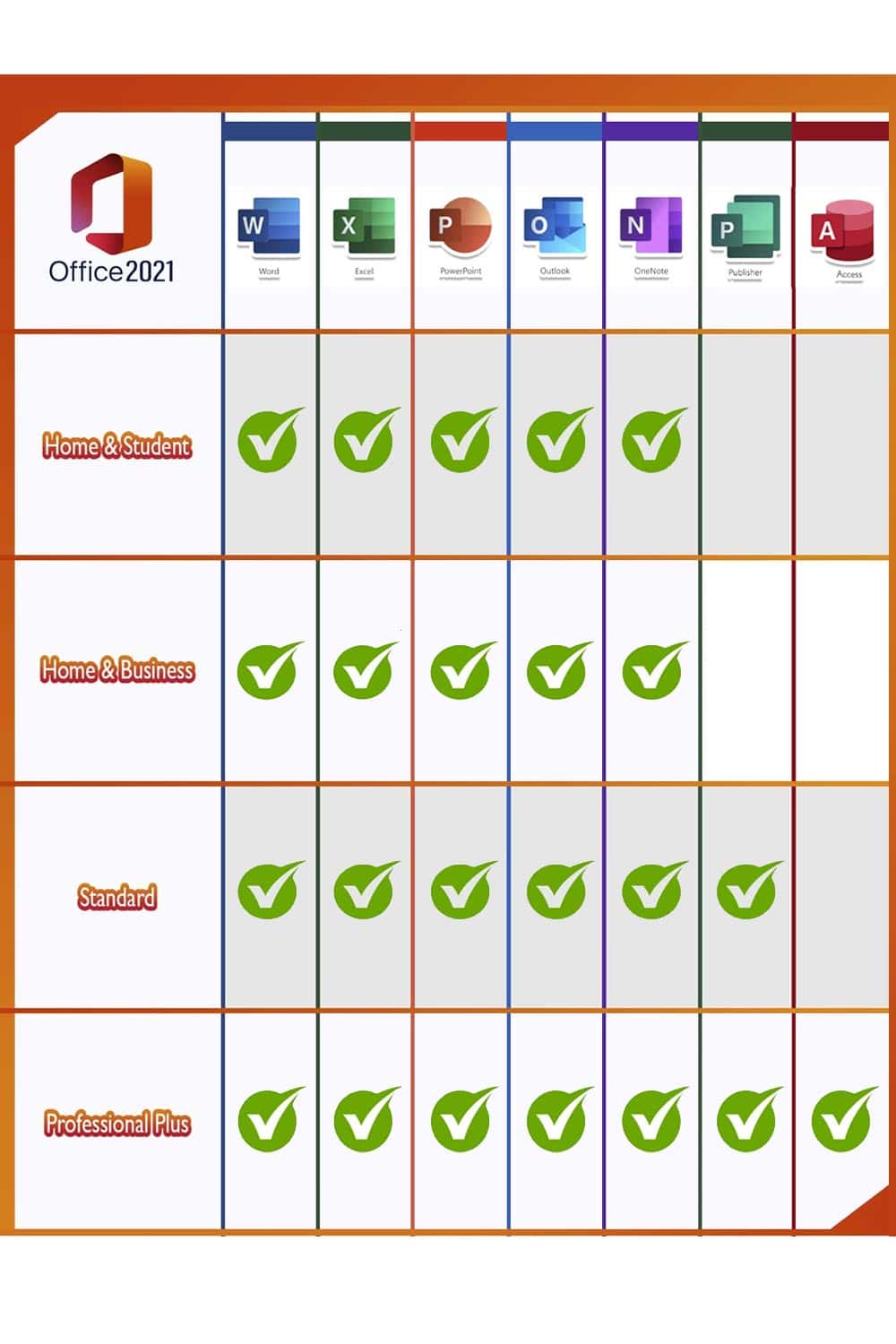
Gli utenti di Microsoft Office che utilizzano l’intera gamma di applicazioni a casa o in ufficio possono contare su Office 2021 Standard Edition. Sono inclusi tutti i programmi più importanti: Word, Excel, Outlook, PowerPoint, Publisher e Access. OneNote è ora disponibile per il download dal Windows Store, in modo da poter prendere rapidamente appunti e renderli disponibili su tutti i dispositivi tramite il cloud. A causa dell’ampia gamma di programmi, la versione Standard si rivolge principalmente a chi lavora a casa, nell’home office, o a chi cerca una soluzione potente e affidabile in ufficio per organizzare documenti, tabelle, ecc.
- WordCreate professional-quality text documents in no time.
- ExcelSmart spreadsheet for information management.
- PowerPointCreate dynamic and impactful presentations.
- OneNoteyour digital notebook.
- OutlookSimplified communication.
- PublisherCreating layouts for professional publications.



Steffen Uhl – :
The best product ever! 100% guaranteed
Heinrich Klein – :
The product works as advertised. I highly recommend it.
simone knittel – :
Quick response and fast payment. Perfect! THANKS!!